Consultants Page
User manual

How to use Consultants Page, the CRM for study-abroad & immigration consultancies

Every screenshot below was taken inside the demo workspace, so what you see here is exactly what you'll see after logging in. Pick a module from the list on the left — 34 of them, covering student management, lead management, university application tracking, invoicing and multi-branch employee permissions — to see what it's for and exactly how to use it.

Getting started / Dashboard
Dashboard screen

Dashboard

/dashboard

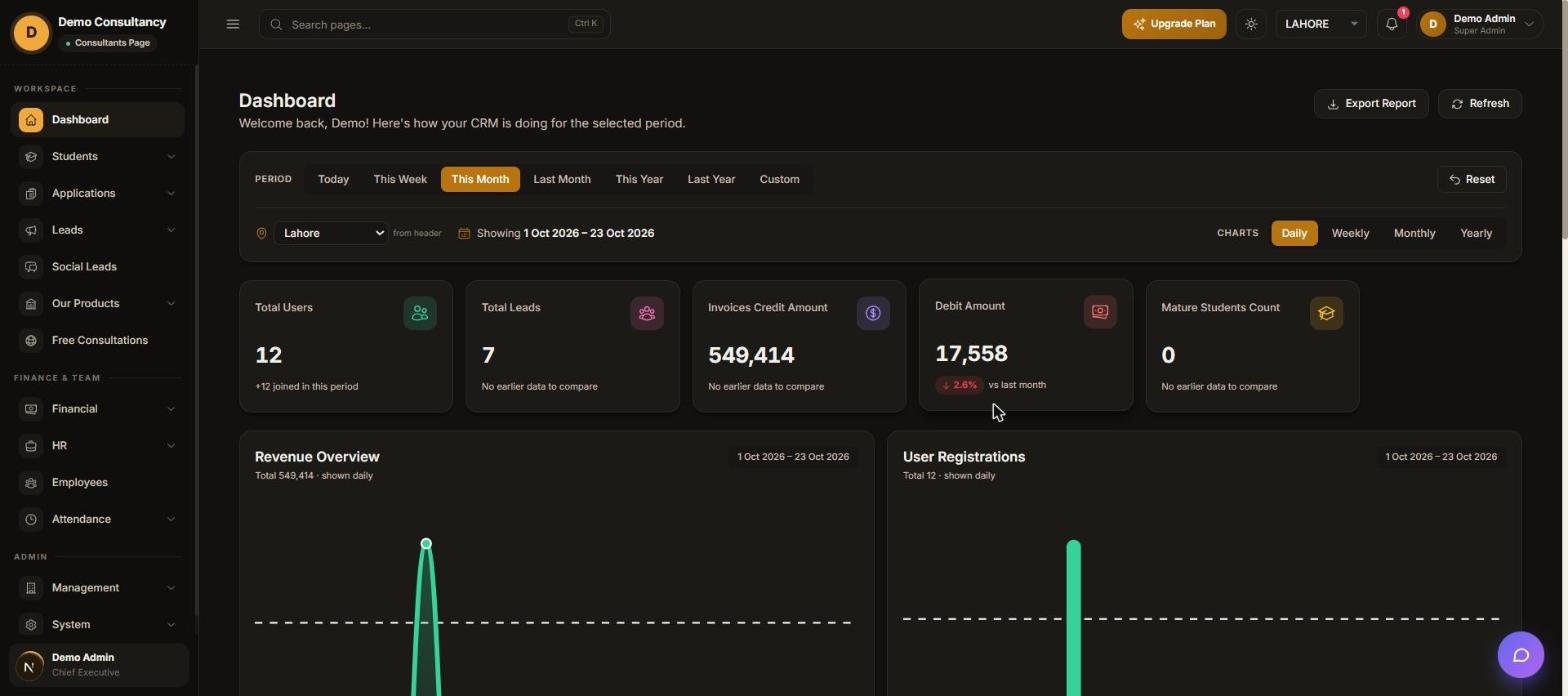
Your home screen after login. Shows totals for users, leads, invoices and mature students for the selected office and time period, plus revenue and registration charts — use it every morning to see how the branch is doing before you open anything else.

How to use it

  1. Pick a date range from the PERIOD row (Today, This Week, This Month, Last Month, This Year, Last Year, or Custom).
  2. Use the location dropdown next to the calendar icon to switch which office branch the numbers belong to (e.g. Lahore, Karachi).
  3. Read the five stat cards — Total Users, Total Leads, Invoices Credit Amount, Debit Amount, Mature Students Count — for a one-glance summary.
  4. Switch the Revenue Overview and User Registrations charts between Daily, Weekly, Monthly or Yearly with the CHARTS buttons.
  5. Click Export Report to download the figures as a file, or Refresh to pull the latest numbers without reloading the page.
FAQ

Frequently asked questions

What is Consultants Page?

Consultants Page is a CRM built specifically for study-abroad and immigration consultancies — it manages students, university applications, leads, invoices and your team across every branch in one workspace.

How do I manage student leads in the CRM?

The Leads module captures enquiries from Facebook, Instagram, TikTok or entered manually, tracks them through pipeline stages like New, Contacted and Converted, and assigns each one to an employee.

Can I track university applications and fees in one place?

Yes — the Applications module links each university application to its student, and Application Fee tracks what's been budgeted, paid and still owed per application.

Does it support multiple office branches?

Yes. Office Locations lets you add every branch (e.g. Lahore, Karachi), and data, budgets and employee access can all be scoped per branch.

Can I control exactly what each employee can see and edit?

Yes — every employee's Permissions tab has a toggle per module for Read, Create, Update, Delete, Assign and per-location access, so access can be as narrow or broad as the role needs.

Is there a free trial for Consultants Page?

Yes — a 7-day free trial with no card required and every module included, so you can test student, application, lead and finance management with your own data before committing.

Still have a question?

Use the chat widget in the app, or reach out from the contact page.

Contact us →